Datafiles
Tip
Use a datafile to work with a file if you want to:
- Read/write to local and cloud files in the same way
- Include it in a
dataset <dataset>that can be sent to a Twined service for processing - Add metadata to it for future sorting and filtering
Key features
Work with local and cloud data
Working with a datafile is the same whether it's local or cloud-based. It's also almost identical to using python built-in open function. For example, to write to a datafile:
from octue.resources import Datafile

datafile = Datafile("path/to/file.dat")

# Or:

datafile = Datafile("gs://my-bucket/path/to/file.dat")

with datafile.open("w") as f:
    f.write("Some data")
    datafile.labels.add("processed")
All the same file modes you'd use with the python built-in open
context manager
are available for datafiles e.g. "r" and "a".
Automatic lazy downloading
Save time and bandwidth by only downloading when necessary.
Downloading data from cloud datafiles is automatic and lazy so you get both low-latency content read/write and quick metadata reads. This makes viewing and filtering by the metadata of cloud datasets and datafiles quick and avoids unnecessary data transfer, energy usage, and costs.
Datafile content isn't downloaded until you:
- Try to read or write its contents using the
Datafile.opencontext manager - Call its
downloadmethod - Use its
local_pathproperty
Read more about downloading files here.
CLI command friendly
Use any command line tool on your datafiles. Datafiles are python objects, but they represent real files that can be fed to any CLI command you like
import subprocess
output = subprocess.check_output(["openfast", datafile.local_path])
Easy and expandable custom metadata
Find the needle in the haystack by making your data searchable. You can set the following metadata on a datafile:
- Timestamp
- Labels (a set of lowercase strings)
- Tags (a dictionary of key-value pairs)
This metadata is stored locally in a .octue file for local datafiles
or on the cloud objects for cloud datafiles and is used during
Datafile instantiation. It can be accessed like this:
datafile.timestamp
>>> datetime.datetime(2022, 5, 4, 17, 57, 57, 136739)

datafile.labels
>>> {"processed"}

datafile.tags
>>> {"organisation": "octue", "energy": "renewable"}
You can update the metadata by setting it on the instance while inside
the Datafile.open context manager.
with datafile.open("a"):
    datafile.labels.add("updated")
You can do this outside the context manager too, but you then need to call the update method:
datafile.labels.add("updated")
datafile.update_metadata()
Upload an existing local datafile
Back up and share your datafiles for collaboration. You can upload an
existing local datafile to the cloud without using the
Datafile.open context manager if you don't need to modify its contents:
datafile.upload("gs://my-bucket/my_datafile.dat", update_metadata=True)
Get file and metadata hashes
Make your analysis reproducible: guarantee a datafile contains exactly the same data as before by checking its hash.
datafile.hash_value
>>> 'mnG7TA=='
You can also check that any metadata is the same.
datafile.metadata_hash_value
>>> 'DIgCHg=='
Immutable ID
Each datafile has an immutable UUID:
datafile.id
>>> '9a1f9b26-6a48-4f2d-be80-468d3270d79b'
Check a datafile's locality
Is this datafile local or in the cloud?
datafile.exists_locally
>>> True

datafile.exists_in_cloud
>>> False
A cloud datafile that has been downloaded will return True for both of
these properties.
Represent HDF5 files
Support fast I/O processing and storage.
Warning
If you want to represent HDF5 files with a Datafile, you must include
the extra requirements provided by the hdf5 key at installation i.e.
pip install octue[hdf5]
or
poetry add octue -E hdf5
Usage examples
The Datafile class can be used functionally or as a context manager.
When used as a context manager, it is analogous with the python
built-in open
function. On
exiting the context (the with block), it closes the datafile locally
and, if the datafile also exists in the cloud, updates the cloud object
with any data or metadata changes.
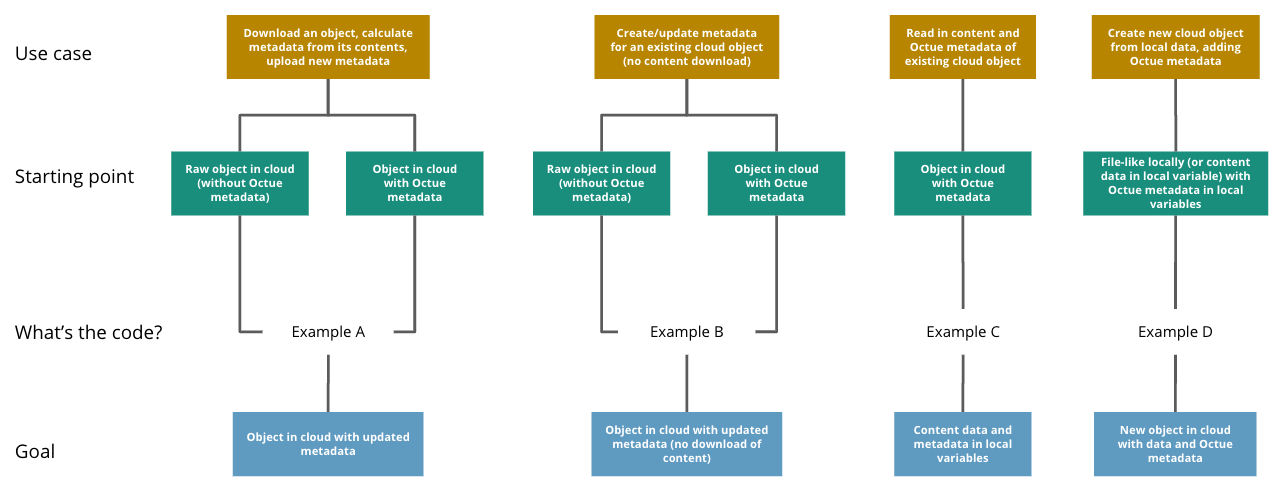
Example A
Scenario: Download a cloud object, calculate Octue metadata from its contents, and add the new metadata to the cloud object
Starting point: Object in cloud with or without Octue metadata
Goal: Object in cloud with updated metadata
from octue.resources import Datafile


datafile = Datafile("gs://my-bucket/path/to/data.csv")

with datafile.open() as f:
    data = f.read()
    new_metadata = metadata_calculating_function(data)

    datafile.timestamp = new_metadata["timestamp"]
    datafile.tags = new_metadata["tags"]
    datafile.labels = new_metadata["labels"]
Example B
Scenario: Add or update Octue metadata on an existing cloud object without downloading its content
Starting point: A cloud object with or without Octue metadata
Goal: Object in cloud with updated metadata
from datetime import datetime
from octue.resources import Datafile


datafile = Datafile("gs://my-bucket/path/to/data.csv")

datafile.timestamp = datetime.now()
datafile.tags = {"manufacturer": "Vestas", "output": "1MW"}
datafile.labels = {"new"}

datafile.upload(update_metadata=True)  # Or, datafile.update_metadata()
Example C
Scenario: Read in the data and Octue metadata of an existing cloud object without intent to update it in the cloud
Starting point: A cloud object with Octue metadata
Goal: Cloud object data (contents) and metadata held locally in local variables
from octue.resources import Datafile


datafile = Datafile("gs://my-bucket/path/to/data.csv")

with datafile.open() as f:
    data = f.read()

metadata = datafile.metadata()
Example D
Scenario: Create a new cloud object from local data, adding Octue metadata
Starting point: A file-like locally (or content data in local variable) with Octue metadata stored in local variables
Goal: A new object in the cloud with data and Octue metadata
For creating new data in a new local file:
from octue.resources import Datafile


datafile = Datafile(
    "path/to/local/file.dat",
    tags={"cleaned": True, "type": "linear"},
    labels={"Vestas"}
)

with datafile.open("w") as f:
    f.write("This is some cleaned data.")

datafile.upload("gs://my-bucket/path/to/data.dat")
For existing data in an existing local file:
from octue.resources import Datafile


tags = {"cleaned": True, "type": "linear"}
labels = {"Vestas"}

datafile = Datafile(path="path/to/local/file.dat", tags=tags, labels=labels)
datafile.upload("gs://my-bucket/path/to/data.dat")