Logging
By default, octue streams your logs to stderr in a nice, readable
format so your log messages are immediately visible when you start
developing without any extra configuration. If you prefer to use your
own handlers or formatters, simply set USE_OCTUE_LOG_HANDLER=0 in the
environment running your app.
Readable logs
Some advantages of the Octue log handler are:
- Its readable format
- Its clear separation of log context from log message.
Below, the context is on the left and includes:
- The time
- Log level
- Module producing the log
- Octue analysis ID
This is followed by the actual log message on the right:
[2021-07-10 20:03:12,713 | INFO | octue.runner | 102ee7d5-4b94-4f8a-9dcd-36dbd00662ec] Hello! The child services template app is running!
Colourised services
Another advantage to using the Octue log handler is that each Twined service is coloured according to its position in the tree, making it much easier to read log messages from multiple levels of children.
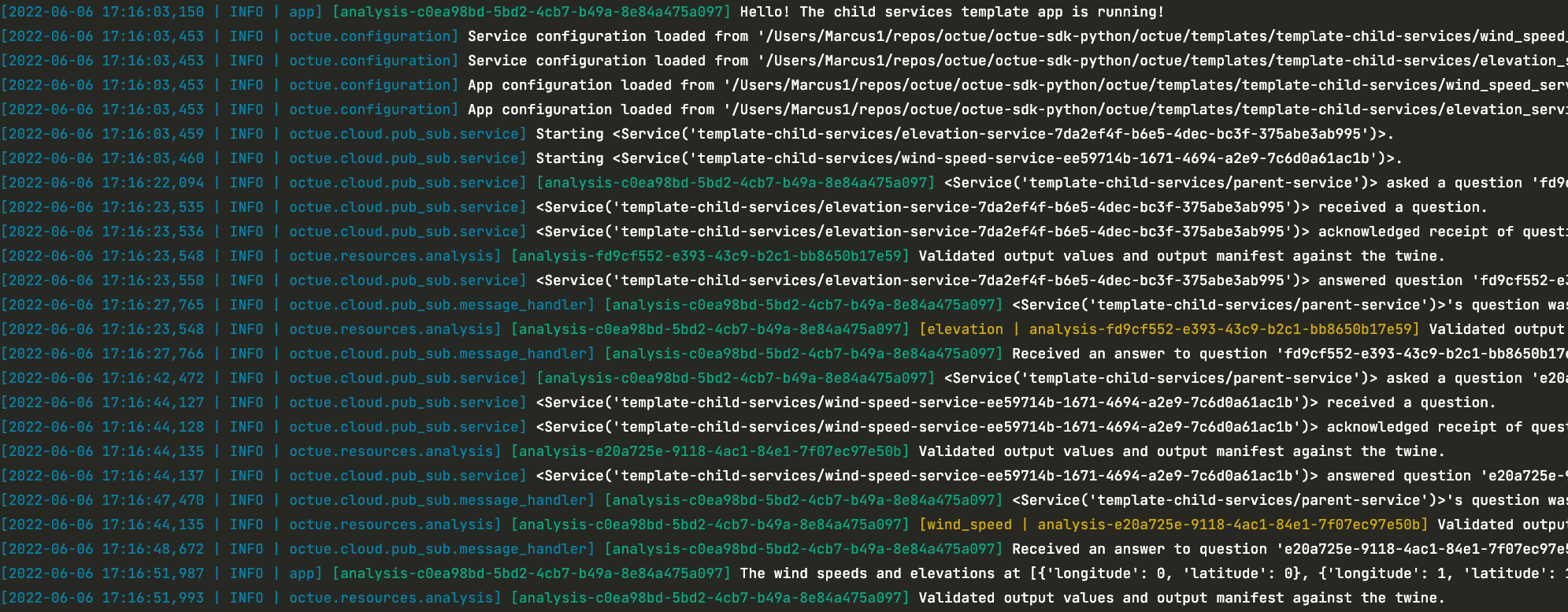
In this example:
- The log context is in blue
- Anything running in the root parent service's app is labeled with the analysis ID in green
- Anything running in the immediate child services (
elevationandwind_speed) are labelled with the analysis ID in yellow - Any children further down the tree (i.e. children of the child services and so on) will have their own labels in other colours consistent to their level
Add extra information
You can add certain log record attributes to the logging context by also providing the following environment variables:
INCLUDE_LINE_NUMBER_IN_LOGS=1- include the line numberINCLUDE_PROCESS_NAME_IN_LOGS=1- include the process nameINCLUDE_THREAD_NAME_IN_LOGS=1- include the thread name